
 LEGALCITY
AXONAUT connection :
First you need to go to your customer area and connect Axonaut to LEGALCITY :
Log in to your customer area at www.legalcity.fr
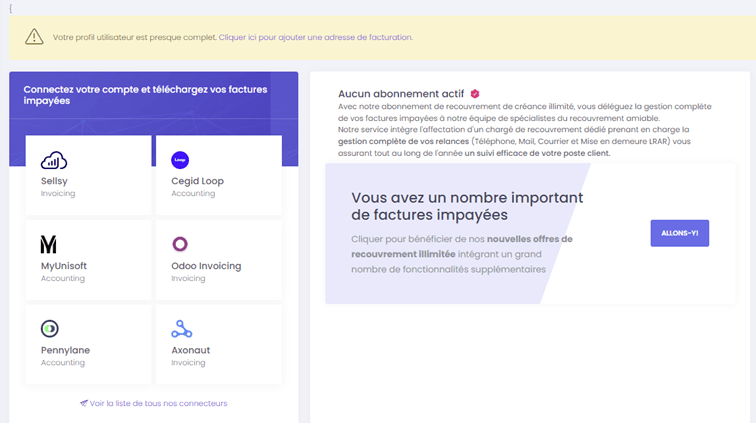
Then, from your customer area, you get this cover page:
Click on: see the list of all our connectors or on https://app.legalcity.fr/integrations
Select AXONAUT connector
You are now on this page:
LEGALCITY MY ACCOUNT
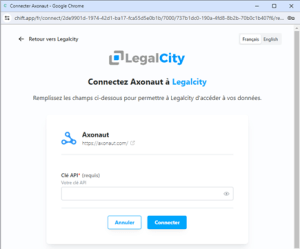
API X LEGALCITY connector
To search for your API key on AXONAUT please follow this path in your Axonaut account settings :
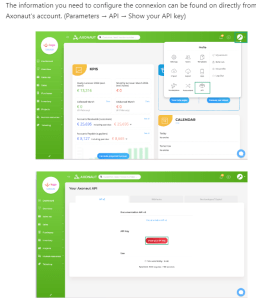
SEARCH API KEY AXONAUT
Return to the LEGALCITY connection tab and paste the API key;
Then let us guide you....
The connector will display in the LEGALCITY account the aged trial balance for the file you have selected.
You can then choose whether to delegate amicable or injunctive collection to LEGALCITY.
You can then track the progress of your files.
ATTENTION: A customer account can only use one connector.
A subscription is required to have more than one.
Here is a list of the different subscriptions available on the LEGALCITY website:
https://legalcity.fr/recouvrez-vos-factures-impayees-en-illimite/
If you have any further questions, or if you have any technical problems, please contact us at service-client@legalcity.fr and send us your screen printouts. We'll get back to you as soon as possible.
Yours sincerely
LEGALCITY
Amicable and judicial debt collection